Guides
|
Building Forms with Directus and SvelteKit Remote Functions
Build a custom webform that submits data into Directus using the remote functions in Svelte.

Alex van der Valk
Senior Solutions Engineer
Today, we’re building a custom webform that will submit data into Directus. We’ll be using the remote functions in Svelte to ensure our form works with or without Javascript and has solid security and data validations.
Before you start you will need:
A new Directus Project with admin access
Familiarity with building a data model in Directus.
Configure a static token for your admin user
This is a recommended approach to building server to server communication.
Create an SDK key for the admin user. To do this, navigate to the Directus user directory, select your user, and scroll down to the "Token" section. Generate a token and save the user. This token will be used to authenticate the SvelteKit application with Directus and will have the form submission permissions required to submit the form.
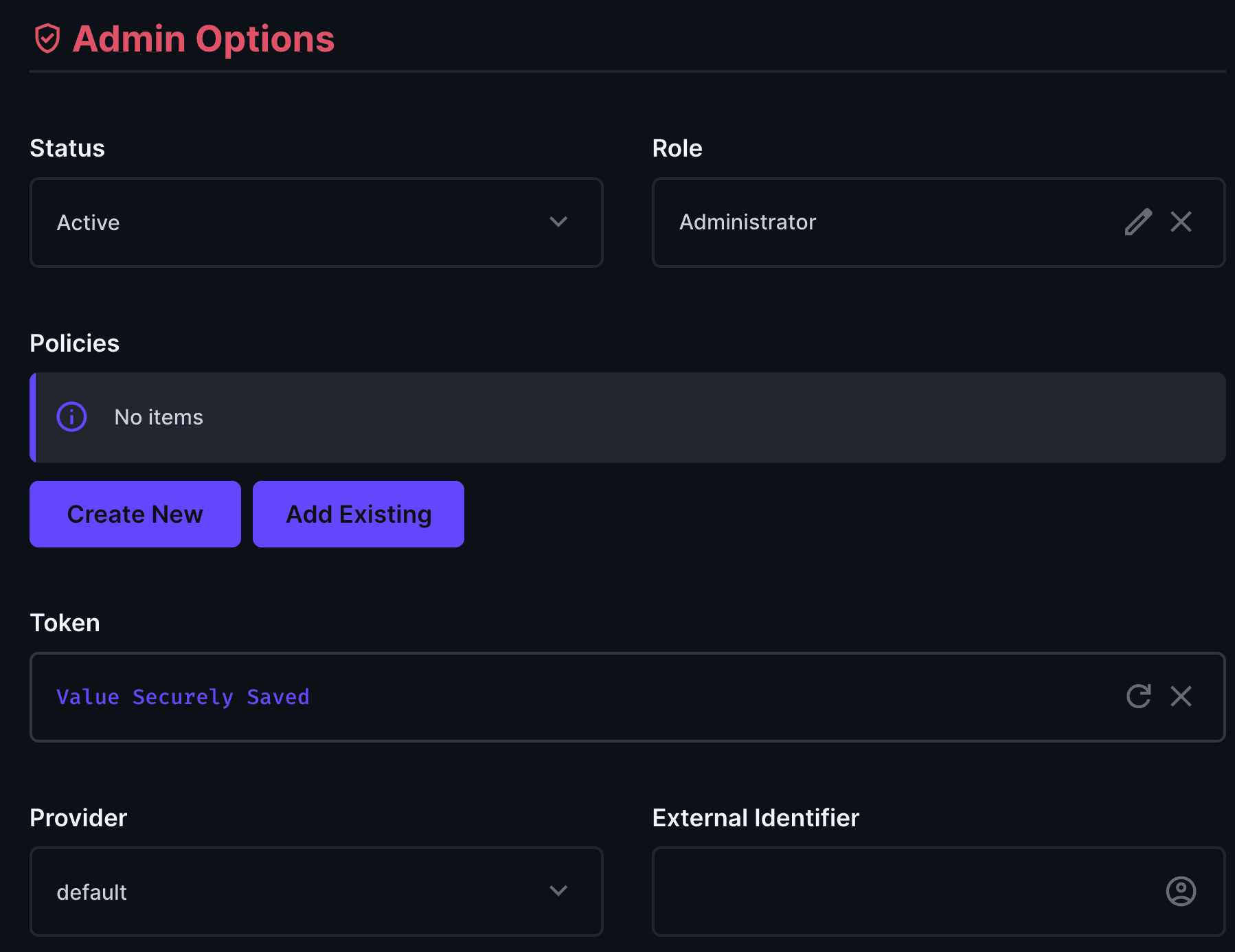
!! Static tokens never expire, so we’ll make sure this key stays on the server side of our Sveltekit Project.
Create a simple data model for storing your form submissions
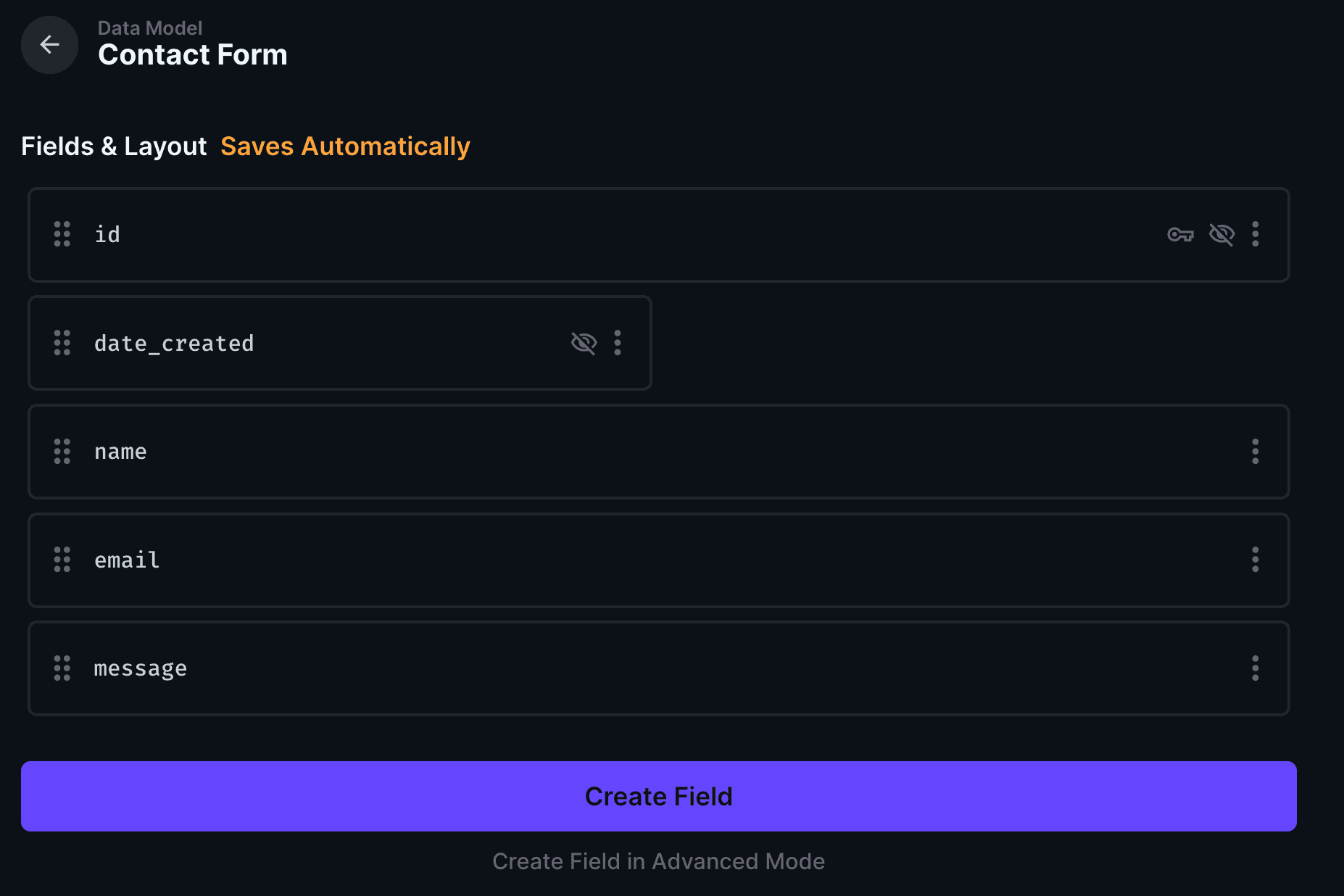
We’ll create a contact form with a name, age, and message field.
Go into the Directus settings, open the “Date Model” section and create a new collection called “contact_form”. Add the date_created automatic field.
Create fields for field in our form:
Type | DataType | Key |
Input | String | name |
Input | String | |
Textarea | Text | message |
Your collection should look something like this:
Set Up Your SvelteKit Project
Follow the instructions as below. This will create a new Sveltekit project with Typescript and Tailwind for some styles.
┌  Welcome to the Svelte CLI! (v0.12.5)
│
◇  Where would you like your project to be created?
│  directus-sveltekit-forms
│
◇  Which template would you like?
│  SvelteKit minimal
│
◇  Add type checking with TypeScript?
│  Yes, using TypeScript syntax
│
◇  What would you like to add to your project? (use arrow keys / space bar)
│  tailwindcss, sveltekit-adapter
│
◇  sveltekit-adapter: Which SvelteKit adapter would you like to use?
│  auto
│
◇  tailwindcss: Which plugins would you like to add?
│  typography, forms
│
◆  Project created
│
◆  Successfully setup add-ons: sveltekit-adapter, tailwindcss
│
◇  Which package manager do you want to install dependencies with?
│  npm
│
│  To skip prompts next time, run:
●  npx sv@0.12.5 create --template minimal --types ts --add sveltekit-adapter="adapter:auto" tailwindcss="plugins:typography,forms" --install npm directus-sveltekit-forms
│
◆  Successfully installed dependencies with npm
┌  Welcome to the Svelte CLI! (v0.12.5)
│
◇  Where would you like your project to be created?
│  directus-sveltekit-forms
│
◇  Which template would you like?
│  SvelteKit minimal
│
◇  Add type checking with TypeScript?
│  Yes, using TypeScript syntax
│
◇  What would you like to add to your project? (use arrow keys / space bar)
│  tailwindcss, sveltekit-adapter
│
◇  sveltekit-adapter: Which SvelteKit adapter would you like to use?
│  auto
│
◇  tailwindcss: Which plugins would you like to add?
│  typography, forms
│
◆  Project created
│
◆  Successfully setup add-ons: sveltekit-adapter, tailwindcss
│
◇  Which package manager do you want to install dependencies with?
│  npm
│
│  To skip prompts next time, run:
●  npx sv@0.12.5 create --template minimal --types ts --add sveltekit-adapter="adapter:auto" tailwindcss="plugins:typography,forms" --install npm directus-sveltekit-forms
│
◆  Successfully installed dependencies with npm
┌  Welcome to the Svelte CLI! (v0.12.5)
│
◇  Where would you like your project to be created?
│  directus-sveltekit-forms
│
◇  Which template would you like?
│  SvelteKit minimal
│
◇  Add type checking with TypeScript?
│  Yes, using TypeScript syntax
│
◇  What would you like to add to your project? (use arrow keys / space bar)
│  tailwindcss, sveltekit-adapter
│
◇  sveltekit-adapter: Which SvelteKit adapter would you like to use?
│  auto
│
◇  tailwindcss: Which plugins would you like to add?
│  typography, forms
│
◆  Project created
│
◆  Successfully setup add-ons: sveltekit-adapter, tailwindcss
│
◇  Which package manager do you want to install dependencies with?
│  npm
│
│  To skip prompts next time, run:
●  npx sv@0.12.5 create --template minimal --types ts --add sveltekit-adapter="adapter:auto" tailwindcss="plugins:typography,forms" --install npm directus-sveltekit-forms
│
◆  Successfully installed dependencies with npm
┌  Welcome to the Svelte CLI! (v0.12.5)
│
◇  Where would you like your project to be created?
│  directus-sveltekit-forms
│
◇  Which template would you like?
│  SvelteKit minimal
│
◇  Add type checking with TypeScript?
│  Yes, using TypeScript syntax
│
◇  What would you like to add to your project? (use arrow keys / space bar)
│  tailwindcss, sveltekit-adapter
│
◇  sveltekit-adapter: Which SvelteKit adapter would you like to use?
│  auto
│
◇  tailwindcss: Which plugins would you like to add?
│  typography, forms
│
◆  Project created
│
◆  Successfully setup add-ons: sveltekit-adapter, tailwindcss
│
◇  Which package manager do you want to install dependencies with?
│  npm
│
│  To skip prompts next time, run:
●  npx sv@0.12.5 create --template minimal --types ts --add sveltekit-adapter="adapter:auto" tailwindcss="plugins:typography,forms" --install npm directus-sveltekit-forms
│
◆  Successfully installed dependencies with npm
Once that's complete, cd into the new project and install some required packages:
@directus/sdkzod
cd directus-sveltekit-forms
npm install @directus/sdk zod
cd directus-sveltekit-forms
npm install @directus/sdk zod
cd directus-sveltekit-forms
npm install @directus/sdk zod
cd directus-sveltekit-forms
npm install @directus/sdk zod
Enable remote functions in your sveltekit project
Open the “svelte.config.js” file and update it with the following code:
import adapter from "@sveltejs/adapter-auto";
/** @type {import('@sveltejs/kit').Config} */
const config = {
    kit: {
          experimental: {
                  remoteFunctions: true,
                },
    adapter: adapter(),
  },
    compilerOptions: {
          experimental: {
                  async: true,
                },
        },
  };
export default config;
import adapter from "@sveltejs/adapter-auto";
/** @type {import('@sveltejs/kit').Config} */
const config = {
    kit: {
          experimental: {
                  remoteFunctions: true,
                },
    adapter: adapter(),
  },
    compilerOptions: {
          experimental: {
                  async: true,
                },
        },
  };
export default config;
import adapter from "@sveltejs/adapter-auto";
/** @type {import('@sveltejs/kit').Config} */
const config = {
    kit: {
          experimental: {
                  remoteFunctions: true,
                },
    adapter: adapter(),
  },
    compilerOptions: {
          experimental: {
                  async: true,
                },
        },
  };
export default config;
import adapter from "@sveltejs/adapter-auto";
/** @type {import('@sveltejs/kit').Config} */
const config = {
    kit: {
          experimental: {
                  remoteFunctions: true,
                },
    adapter: adapter(),
  },
    compilerOptions: {
          experimental: {
                  async: true,
                },
        },
  };
export default config;
Create a folder named ‘server’ in the ‘lib’ directory. Create a file called directus.ts, and add this code and replace the static token with our newly generated token:
import { createDirectus, staticToken, rest } from '@directus/sdk';
export const directus = createDirectus('http://localhost:8055')
.with(staticToken('YOUR_STATIC_TOKEN'))
.with(rest());
import { createDirectus, staticToken, rest } from '@directus/sdk';
export const directus = createDirectus('http://localhost:8055')
.with(staticToken('YOUR_STATIC_TOKEN'))
.with(rest());
import { createDirectus, staticToken, rest } from '@directus/sdk';
export const directus = createDirectus('http://localhost:8055')
.with(staticToken('YOUR_STATIC_TOKEN'))
.with(rest());
import { createDirectus, staticToken, rest } from '@directus/sdk';
export const directus = createDirectus('http://localhost:8055')
.with(staticToken('YOUR_STATIC_TOKEN'))
.with(rest());
!! the ‘server’ directory ensures that our static token won’t leak into the frontend code, and makes it clear that this code will only ever be accessed from our Sveltekit server.
Next, create a file called forms.remote.ts in the lib folder. This will handle the form submission logic, as well as passing this information into Directus.
import { form } from '$app/server';
import { z } from 'zod';
import { directus } from '$lib/server/directus';
import { createItem } from '@directus/sdk';
import { error } from '@sveltejs/kit';
const formSchema = z.object({
      name: z.string().min(3),
      email: z.email(),
      message: z.string().min(15),
  });
export const submitForm = form(formSchema, async (data) => {
      const { name, email, message } = data;
      try {
                await directus.request(createItem("contact_form", {
                              name,
                              email,
                              message
                                        }));
                return {
                              success: true,
                              message: 'Form submitted successfully'
                                        };
            } catch {
                error(500, 'Failed to submit form');
            }
  });
import { form } from '$app/server';
import { z } from 'zod';
import { directus } from '$lib/server/directus';
import { createItem } from '@directus/sdk';
import { error } from '@sveltejs/kit';
const formSchema = z.object({
      name: z.string().min(3),
      email: z.email(),
      message: z.string().min(15),
  });
export const submitForm = form(formSchema, async (data) => {
      const { name, email, message } = data;
      try {
                await directus.request(createItem("contact_form", {
                              name,
                              email,
                              message
                                        }));
                return {
                              success: true,
                              message: 'Form submitted successfully'
                                        };
            } catch {
                error(500, 'Failed to submit form');
            }
  });
import { form } from '$app/server';
import { z } from 'zod';
import { directus } from '$lib/server/directus';
import { createItem } from '@directus/sdk';
import { error } from '@sveltejs/kit';
const formSchema = z.object({
      name: z.string().min(3),
      email: z.email(),
      message: z.string().min(15),
  });
export const submitForm = form(formSchema, async (data) => {
      const { name, email, message } = data;
      try {
                await directus.request(createItem("contact_form", {
                              name,
                              email,
                              message
                                        }));
                return {
                              success: true,
                              message: 'Form submitted successfully'
                                        };
            } catch {
                error(500, 'Failed to submit form');
            }
  });
import { form } from '$app/server';
import { z } from 'zod';
import { directus } from '$lib/server/directus';
import { createItem } from '@directus/sdk';
import { error } from '@sveltejs/kit';
const formSchema = z.object({
      name: z.string().min(3),
      email: z.email(),
      message: z.string().min(15),
  });
export const submitForm = form(formSchema, async (data) => {
      const { name, email, message } = data;
      try {
                await directus.request(createItem("contact_form", {
                              name,
                              email,
                              message
                                        }));
                return {
                              success: true,
                              message: 'Form submitted successfully'
                                        };
            } catch {
                error(500, 'Failed to submit form');
            }
  });
A lot is happening in this file:
First, a Zod schema is defined. This enforces some rules that our form must follow, so we don’t get any bad data.
Next, the submitForm function runs whenever someone submits a form on our website. The incoming payload is sanitized through Zod so we have full type safety.
Finally, the data is sent to your Directus project via the Directus SDK.
Almost done..
Next, we create a Form.Svelte file in our lib directory and add the following code.
<script lang="ts">
    import { submitForm } from "$lib/forms.remote";
  </script>
<div class="flex justifyecenter mt-10">
    <form class="space-y-4 max-w-md w-96 p-4 border rounded" {...submitForm}>
          <div class="flex flex-col gap-1">
                  <label for="name" class="font-medium">Name</label>
                  <input
                            {...submitForm.fields.name.as("text")}
                            class="border rounded px-3 py-2"
                    />
                  {#each submitForm.fields.name.issues() as issue}
                    <p class="text-red-500 text-bold">{issue.message}</p>
                  {/each}
                        </div>
                        <div class="flex flex-col gap-1">
                  <label for="email" class="font-medium">Email</label>
                  <input
                            {...submitForm.fields.email.as("text")}
                            class="border rounded px-3 py-2"
                          />
                  {#each submitForm.fields.email.issues() as issue}
                    <p class="text-red-500 text-bold">{issue.message}</p>
                  {/each}
                        </div>
                        <div class="flex flex-col gap-1">
                  <label for="message" class="font-medium">Message</label>
                  <textarea
                            {...submitForm.fields.message.as("text")}
                            class="border rounded px-3 py-2 min-h-[120px]"
                          ></textarea>
                  {#each submitForm.fields.message.issues() as issue}
                    <p class="text-red-500 text-bold">{issue.message}</p>
                  {/each}
                        </div>
                        <button class="bg-blue-600 text-white px-4 py-2 rounded hover:bg-blue-700">
                  Send
                </button>
          {#if submitForm.result?.success}
            <p class="text-green-500 text-bold">Form submitted successfully</p>
          {/if}
              </form>
            </div>
<script lang="ts">
    import { submitForm } from "$lib/forms.remote";
  </script>
<div class="flex justifyecenter mt-10">
    <form class="space-y-4 max-w-md w-96 p-4 border rounded" {...submitForm}>
          <div class="flex flex-col gap-1">
                  <label for="name" class="font-medium">Name</label>
                  <input
                            {...submitForm.fields.name.as("text")}
                            class="border rounded px-3 py-2"
                    />
                  {#each submitForm.fields.name.issues() as issue}
                    <p class="text-red-500 text-bold">{issue.message}</p>
                  {/each}
                        </div>
                        <div class="flex flex-col gap-1">
                  <label for="email" class="font-medium">Email</label>
                  <input
                            {...submitForm.fields.email.as("text")}
                            class="border rounded px-3 py-2"
                          />
                  {#each submitForm.fields.email.issues() as issue}
                    <p class="text-red-500 text-bold">{issue.message}</p>
                  {/each}
                        </div>
                        <div class="flex flex-col gap-1">
                  <label for="message" class="font-medium">Message</label>
                  <textarea
                            {...submitForm.fields.message.as("text")}
                            class="border rounded px-3 py-2 min-h-[120px]"
                          ></textarea>
                  {#each submitForm.fields.message.issues() as issue}
                    <p class="text-red-500 text-bold">{issue.message}</p>
                  {/each}
                        </div>
                        <button class="bg-blue-600 text-white px-4 py-2 rounded hover:bg-blue-700">
                  Send
                </button>
          {#if submitForm.result?.success}
            <p class="text-green-500 text-bold">Form submitted successfully</p>
          {/if}
              </form>
            </div>
<script lang="ts">
    import { submitForm } from "$lib/forms.remote";
  </script>
<div class="flex justifyecenter mt-10">
    <form class="space-y-4 max-w-md w-96 p-4 border rounded" {...submitForm}>
          <div class="flex flex-col gap-1">
                  <label for="name" class="font-medium">Name</label>
                  <input
                            {...submitForm.fields.name.as("text")}
                            class="border rounded px-3 py-2"
                    />
                  {#each submitForm.fields.name.issues() as issue}
                    <p class="text-red-500 text-bold">{issue.message}</p>
                  {/each}
                        </div>
                        <div class="flex flex-col gap-1">
                  <label for="email" class="font-medium">Email</label>
                  <input
                            {...submitForm.fields.email.as("text")}
                            class="border rounded px-3 py-2"
                          />
                  {#each submitForm.fields.email.issues() as issue}
                    <p class="text-red-500 text-bold">{issue.message}</p>
                  {/each}
                        </div>
                        <div class="flex flex-col gap-1">
                  <label for="message" class="font-medium">Message</label>
                  <textarea
                            {...submitForm.fields.message.as("text")}
                            class="border rounded px-3 py-2 min-h-[120px]"
                          ></textarea>
                  {#each submitForm.fields.message.issues() as issue}
                    <p class="text-red-500 text-bold">{issue.message}</p>
                  {/each}
                        </div>
                        <button class="bg-blue-600 text-white px-4 py-2 rounded hover:bg-blue-700">
                  Send
                </button>
          {#if submitForm.result?.success}
            <p class="text-green-500 text-bold">Form submitted successfully</p>
          {/if}
              </form>
            </div>
<script lang="ts">
    import { submitForm } from "$lib/forms.remote";
  </script>
<div class="flex justifyecenter mt-10">
    <form class="space-y-4 max-w-md w-96 p-4 border rounded" {...submitForm}>
          <div class="flex flex-col gap-1">
                  <label for="name" class="font-medium">Name</label>
                  <input
                            {...submitForm.fields.name.as("text")}
                            class="border rounded px-3 py-2"
                    />
                  {#each submitForm.fields.name.issues() as issue}
                    <p class="text-red-500 text-bold">{issue.message}</p>
                  {/each}
                        </div>
                        <div class="flex flex-col gap-1">
                  <label for="email" class="font-medium">Email</label>
                  <input
                            {...submitForm.fields.email.as("text")}
                            class="border rounded px-3 py-2"
                          />
                  {#each submitForm.fields.email.issues() as issue}
                    <p class="text-red-500 text-bold">{issue.message}</p>
                  {/each}
                        </div>
                        <div class="flex flex-col gap-1">
                  <label for="message" class="font-medium">Message</label>
                  <textarea
                            {...submitForm.fields.message.as("text")}
                            class="border rounded px-3 py-2 min-h-[120px]"
                          ></textarea>
                  {#each submitForm.fields.message.issues() as issue}
                    <p class="text-red-500 text-bold">{issue.message}</p>
                  {/each}
                        </div>
                        <button class="bg-blue-600 text-white px-4 py-2 rounded hover:bg-blue-700">
                  Send
                </button>
          {#if submitForm.result?.success}
            <p class="text-green-500 text-bold">Form submitted successfully</p>
          {/if}
              </form>
            </div>
Add the Form component into your main +page.svelte file
<script lang="ts">
    import Form from "$lib/Form.svelte";
  </script>
<Form
<script lang="ts">
    import Form from "$lib/Form.svelte";
  </script>
<Form
<script lang="ts">
    import Form from "$lib/Form.svelte";
  </script>
<Form
<script lang="ts">
    import Form from "$lib/Form.svelte";
  </script>
<Form
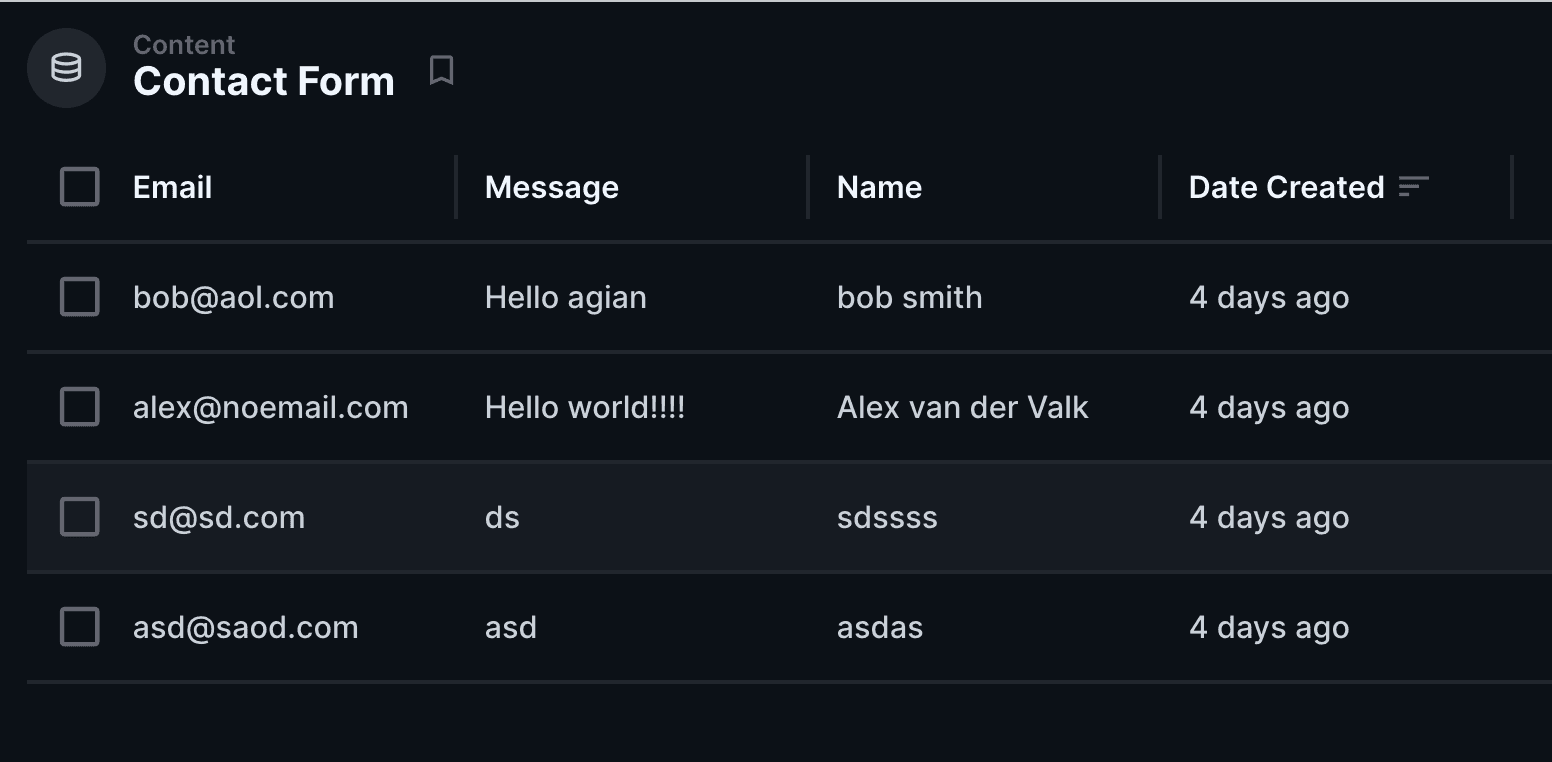
Finally, you can run the application and test it out.
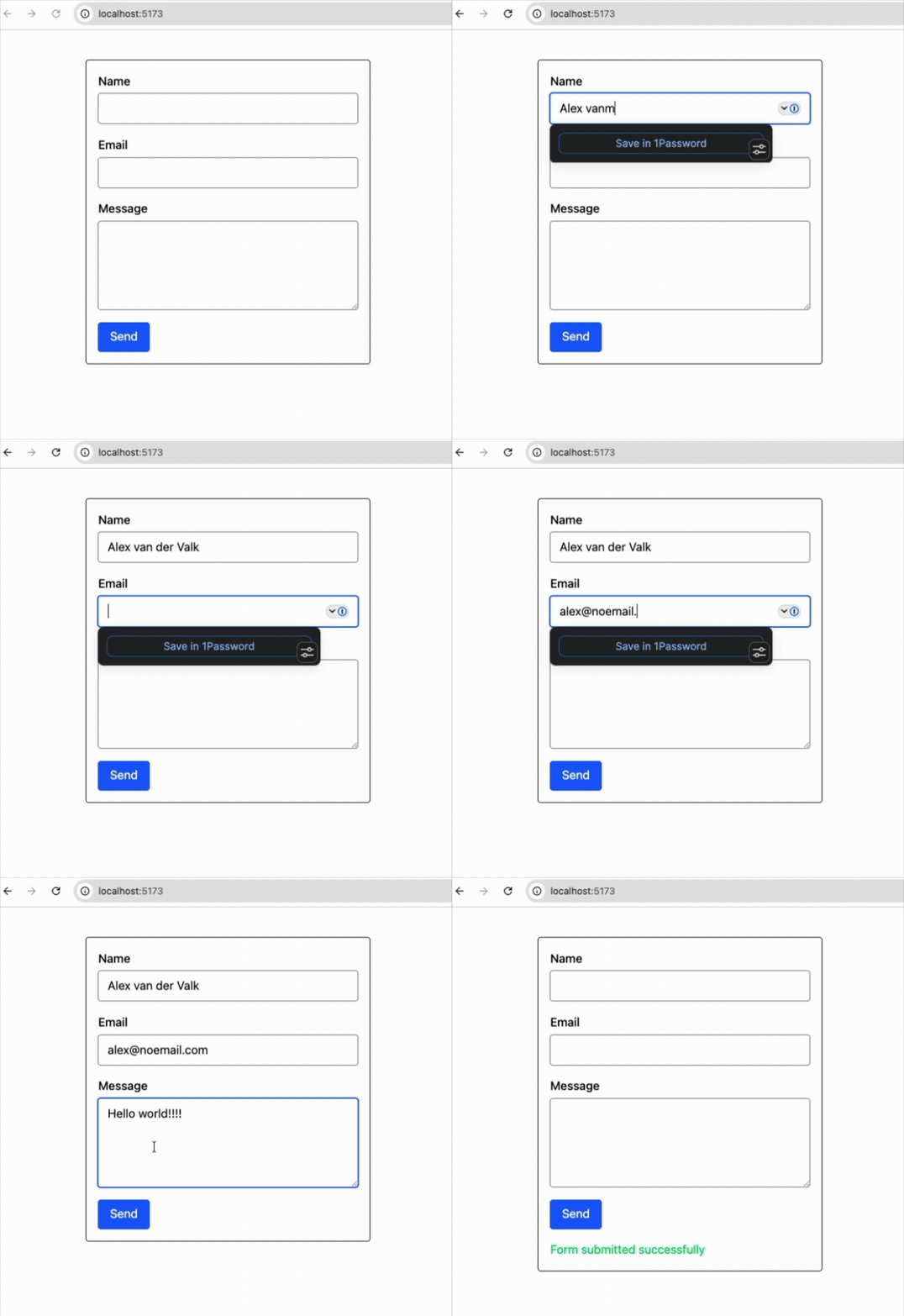
We’ve just built a fully server side application that will work with or without Javascript.
You can find the full SvelteKit project over here.
KEEP EXPLORING
Explore the product context, implementation paths, and more guides from Directus.
Directus
The collaborative backend for builders & AI.
SOC 2
Type II
G2
4.9
GDPR
Compliant


Directus
The collaborative backend for builders & AI.
SOC 2
Type II
G2
4.9
GDPR
Compliant
Directus
The collaborative backend for builders & AI.
SOC 2
Type II
G2
4.9
GDPR
Compliant
Directus
The collaborative backend for builders & AI.
SOC 2
Type II
G2
4.9
GDPR
Compliant