Building Forms with Directus and SvelteKit Remote Functions
Build a custom webform that submits data into Directus using the remote functions in Svelte, ensuring the form works with or without Javascript and has solid security and data validations.
Alex van der Valk
Senior Solutions Engineer
Today, we’re building a custom webform that will submit data into Directus. We’ll be using the remote functions in Svelte to ensure our form works with or without Javascript and has solid security and data validations.
This is a recommended approach to building server to server communication.
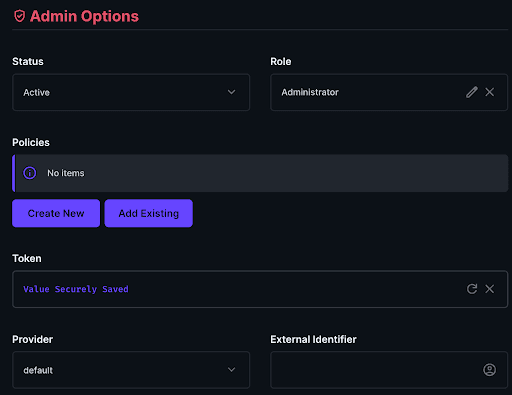
Create an SDK key for the admin user. To do this, navigate to the Directus user directory, select your user, and scroll down to the "Token" section. Generate a token and save the user. This token will be used to authenticate the SvelteKit application with Directus and will have the form submission permissions required to submit the form.
Static tokens never expire, so we’ll make sure this key stays on the server side of our Sveltekit Project.
Create a simple data model for storing your form submissions.
We’ll create a contact form with a name, age, and message field.
Go into the Directus settings, open the “Date Model” section and create a new collection called “contact_form”. Add the date_created automatic field.
Create fields for field in our form:
Type
DataType
Key
Input
String
name
Input
String
email
Textarea
Text
message
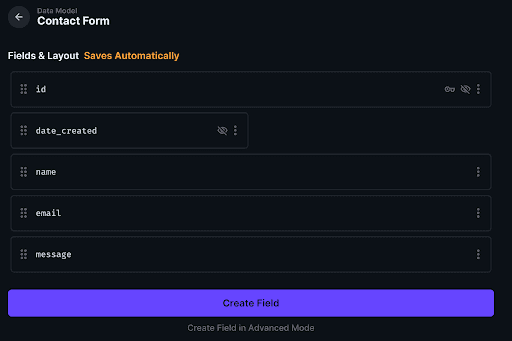
Your collection should look something like this:
Set Up Your SvelteKit Project
Follow the instructions as below. This will create a new Sveltekit project with Typescript and Tailwind for some styles.
┌ Welcome to the Svelte CLI! (v0.12.5)│◇ Where would you like your project to be created?
│ directus-sveltekit-forms
│◇ Which template would you like?
│ SvelteKitminimal│◇ Add type checking withTypeScript?
│ Yes,using TypeScript syntax│◇ What would you like to add to your project? (use arrowkeys / space bar)│ tailwindcss,sveltekit-adapter│◇ sveltekit-adapter:Which SvelteKit adapter would you like to use?
│ auto│◇ tailwindcss:Which plugins would you like to add?
│ typography,forms│◆ Project created│◆ Successfully setup add-ons:sveltekit-adapter,tailwindcss│◇ Which package manager doyou want to install dependencies with?
│ npm││ To skip prompts next time,run:● npx sv@0.12.5create --template minimal --types ts --add sveltekit-adapter="adapter:auto"tailwindcss="plugins:typography,forms" --install npm directus-sveltekit-forms│◆ Successfully installed dependencies withnpm
┌ Welcome to the Svelte CLI! (v0.12.5)│◇ Where would you like your project to be created?
│ directus-sveltekit-forms
│◇ Which template would you like?
│ SvelteKitminimal│◇ Add type checking withTypeScript?
│ Yes,using TypeScript syntax│◇ What would you like to add to your project? (use arrowkeys / space bar)│ tailwindcss,sveltekit-adapter│◇ sveltekit-adapter:Which SvelteKit adapter would you like to use?
│ auto│◇ tailwindcss:Which plugins would you like to add?
│ typography,forms│◆ Project created│◆ Successfully setup add-ons:sveltekit-adapter,tailwindcss│◇ Which package manager doyou want to install dependencies with?
│ npm││ To skip prompts next time,run:● npx sv@0.12.5create --template minimal --types ts --add sveltekit-adapter="adapter:auto"tailwindcss="plugins:typography,forms" --install npm directus-sveltekit-forms│◆ Successfully installed dependencies withnpm
┌ Welcome to the Svelte CLI! (v0.12.5)│◇ Where would you like your project to be created?
│ directus-sveltekit-forms
│◇ Which template would you like?
│ SvelteKitminimal│◇ Add type checking withTypeScript?
│ Yes,using TypeScript syntax│◇ What would you like to add to your project? (use arrowkeys / space bar)│ tailwindcss,sveltekit-adapter│◇ sveltekit-adapter:Which SvelteKit adapter would you like to use?
│ auto│◇ tailwindcss:Which plugins would you like to add?
│ typography,forms│◆ Project created│◆ Successfully setup add-ons:sveltekit-adapter,tailwindcss│◇ Which package manager doyou want to install dependencies with?
│ npm││ To skip prompts next time,run:● npx sv@0.12.5create --template minimal --types ts --add sveltekit-adapter="adapter:auto"tailwindcss="plugins:typography,forms" --install npm directus-sveltekit-forms│◆ Successfully installed dependencies withnpm
┌ Welcome to the Svelte CLI! (v0.12.5)│◇ Where would you like your project to be created?
│ directus-sveltekit-forms
│◇ Which template would you like?
│ SvelteKitminimal│◇ Add type checking withTypeScript?
│ Yes,using TypeScript syntax│◇ What would you like to add to your project? (use arrowkeys / space bar)│ tailwindcss,sveltekit-adapter│◇ sveltekit-adapter:Which SvelteKit adapter would you like to use?
│ auto│◇ tailwindcss:Which plugins would you like to add?
│ typography,forms│◆ Project created│◆ Successfully setup add-ons:sveltekit-adapter,tailwindcss│◇ Which package manager doyou want to install dependencies with?
│ npm││ To skip prompts next time,run:● npx sv@0.12.5create --template minimal --types ts --add sveltekit-adapter="adapter:auto"tailwindcss="plugins:typography,forms" --install npm directus-sveltekit-forms│◆ Successfully installed dependencies withnpm
Ready to move faster?
30 minutes with a product specialist. See how Directus fits your stack.